


For Binance P2P merchants

Automate your operation on Binance P2P.

Your ads, conversations and payments in one coordinated workflow. From order to receipt, with your rules and under your control.

Less manual work.
More time for your business.

The customer dashboard is currently in Spanish.

7 days free · No card required.

  • BinanceAvailable
  • Coming soon
  • Coming soon
  • MEXCComing soon
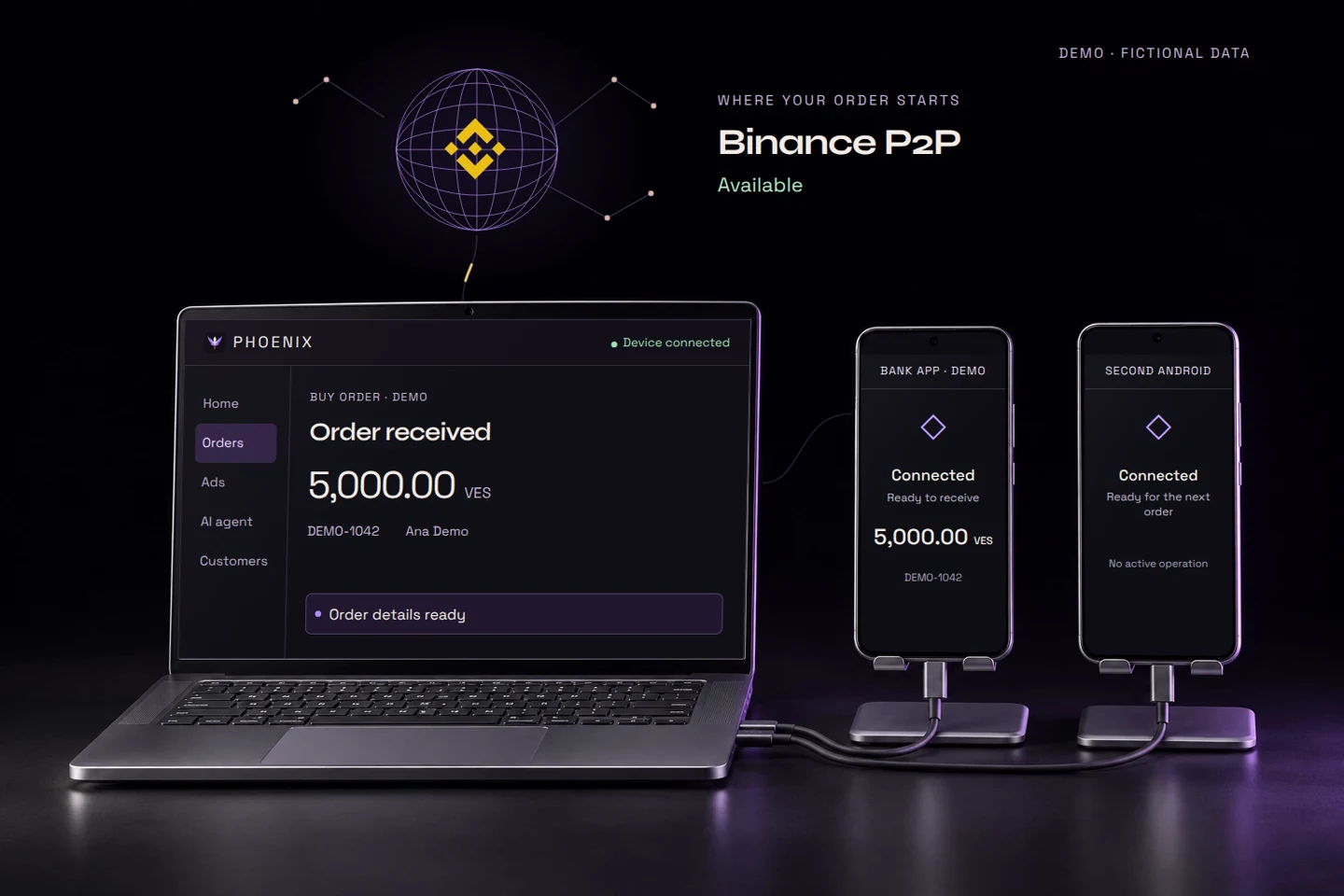
A Windows laptop running Phoenix and two Android phones connected by USB, with Binance above them. Illustration using fictional data.
Demo with fictional data: a Binance order reaches Phoenix on your laptop. The connected Android executes the payment if it meets your configured criteria and returns the receipt. Bybit, OKX and MEXC are shown only as upcoming connections.

Phoenix is independent software. It is not affiliated with Binance or the banks mentioned.

01 / The system

One operation.
Everything connected.

Manage ads, follow orders and check every payment in one place. Phoenix connects the steps; you define the rules and decide how to handle exceptions.

01Your strategy. Your rules. Configure your ads and choose which offers to compete with.

02Keep the full picture. Find each order's conversation, details and evidence together.

03From the queue to the receipt. Follow supported payments executed by your device, with their evidence.

02 / Explore the dashboard

Every order,
in view.

See what is pending, what is moving forward and what needs your decision, with the context intact. Explore this fictional demo of the workspace you would use to run your operation.

app.phoenix7ai.com / operations DEMO · FICTIONAL DATA
Operations/In progress
ORDERS / 04

In progress

OrderCounterpartyBankAmountStatus
DEMO-001Buy Lucía DemoBBVA Provincial9,900.00 VES Processing
DEMO-002Sell Mateo DemoBanco de Venezuela6,450.00 VES Queued
DEMO-003Buy Andrea DemoBBVA Provincial12,180.00 VES Needs attention
DEMO-004Sell Daniel DemoBanco de Venezuela3,200.00 VES Validated
Example sequence
ReceivedAccount ownershipQueueResult
Illustrative view

Illustrative demo with fictional data. It does not show live activity or allow you to execute operations.

03 / The workflow

From your ad
to the receipt.

It is not about clicking faster. It is about knowing what happened, what comes next and when to step in. Phoenix connects the stages; you oversee your operation and reconcile uncertain results.

See how Phoenix works

From your ads and conversations to the payment and its receipt. A walkthrough with fictional data and simulated payments.

Start your free trial

Already a customer? Open my dashboard

From your phone,
back to the order.

View the receipt without losing context. Phoenix keeps the evidence with the transaction it belongs to.

These examples recreate the appearance of a BDV mobile payment and a BBVA Provincial transfer. All data is fictional: these are not bank-issued documents or proof of payment.

Back to the demo
FICTIONAL EXAMPLE · NOT VALID
Banco de VenezuelaBDVApp

Mobile payment complete

Example operation

Bs 2,500.00

Example reference
DEMO-BDV-1042
Example date and time
21/10/2026 · 10:24
Destination bank
Banco de Venezuela · 0102
Fictional beneficiary
Lucía Demo
ID document
V-•••• DEMO
Phone
04•• ••• DEMO
Description
Order DEMO-1042
DEMO · NOT A VALID BANK RECEIPTVisual recreation by Phoenix. Not issued by BDV. Not proof of payment.
BDVMobile payment · Demo data
FICTIONAL EXAMPLE · NOT VALID
BBVAProvincialProvinet Móvil

Transfer successful

To another BBVA Provincial account holder

Bs 2,500.00

Example transaction number
DEMO-BBVA-2048
Example date and time
21/10/2026 · 10:24
Fictional source account
0108 •••• •••• DEMO
Fictional beneficiary
Lucía Demo
Fictional destination account
0108 •••• •••• DEMO
Description
Order DEMO-2048
DEMO · NOT A VALID BANK RECEIPTVisual recreation by Phoenix. Not issued by BBVA Provincial. Not proof of payment.
BBVA ProvincialSame-bank transfer · Demo data

04 / Features

Your work,
connected.

Find an offer, follow the order and check its outcome without piecing everything together yourself. These tools keep your operation moving.

Try Phoenix free
01P2P buying and selling

Choose an offer with its limits, terms and advertiser in view.

  • Buy and sell offers with filters for asset, currency, amount and payment method.
  • Check availability, limits and requirements for each offer.
  • Advertiser profiles and statistics, alongside their published ads.
  • Advertiser terms and offers from verified merchants, Pro merchants and block traders.
02Ad management

Prepare your offers where you already follow your orders. Less switching between screens to keep them up to date.

  • Guided ad creation and editing for ads you have already published.
  • Set prices, quantities, transaction limits and payment deadlines.
  • Payment methods, conditions and terms for each ad.
  • Publish, pause and check the status of your ads.
03Competition for each ad

Stop repeating every price adjustment by hand. Set each ad's target and limit, then oversee its rules.

  • Independent bots for each ad, with start, pause and stop controls.
  • Position or price targets, increments and permitted price limits.
  • Filters for amount, method, merchant type and payment time.
  • Track competitors and actual availability, with controlled intervals between adjustments.
04Orders and attention

Find what needs your attention without checking every order again.

  • Purchases and sales that are in progress, paid, completed or canceled.
  • Attention and Appeals inboxes with indicators to help you find issues.
  • Search by number, name or alias, and filter to find a transaction.
  • Counterparty details, receipts, history and activity records.
05Chat and appeals

Pick up a conversation or review a dispute with the order's messages and evidence together.

  • Order chat with messages, images and receipts.
  • Image thumbnails and a viewer for reviewing evidence.
  • Create and track appeals according to the case and the actions available.
  • Support comments, additional evidence and the order's appeal history.
06Payments and the order queue

Delegate repetitive steps for supported payments, while keeping exceptions under review.

  • Mobile payments and transfers through a bank adapter architecture: currently Banco de Venezuela and BBVA Provincial; other banks are evaluated individually.
  • Rules based on payment method, ad, amount and time remaining on the order.
  • Account holder validation and review of incomplete or conflicting details.
  • Receipts, alerts and review of uncertain outcomes before proceeding.
Check my bank
07Market analysis

Compare your price references with the observed market before setting your strategy.

  • USDT buy and sell references by currency and merchant type.
  • Charts and candlesticks from observed history, where coverage is available.
  • Compare prices, ranges and advertised volume for different amounts.
  • Market monitoring kept separate from your competition bot rules.
08Team, security and alerts

Define who can do what and receive alerts when a situation needs a decision.

  • Team members, invitations and role-based permissions.
  • Authenticator, passkeys and authorization for sensitive actions.
  • Link and revoke execution devices.
  • Alerts in Phoenix and Telegram about orders, incidents and appeal updates.
09Order assistant

Keep the conversation moving without drafting every reply from scratch. The assistant uses AI to respond with the context and requirements you configured.

  • Replies in the order chat based on the situation: missing details, customer questions and requirement status.
  • Requests only what you configured: ID document, selfie or bank account.
  • A greeting in your brand's voice, with response limits per conversation.
  • The assistant uses the AI provider you configure; usage is billed separately, outside your plan.
  • It does not confirm incoming funds, make payments or release crypto; Phoenix maintains control of each order.

05 / Control

Automate.
Stay in control.

Repetitive work can be automated. Important decisions still need context: clear rules, evidence and alerts so you can act when needed.

  1. 01

    Rules you choose

    Define how your ads compete and which supported transactions may be executed. The configuration is yours.

  2. 02

    Evidence before assumptions

    Check each stage and its recorded outcome. A payment in progress is not presented as confirmed.

  3. 03

    Alerts for decisions

    Review incidents and reconcile uncertain outcomes before proceeding. Automation does not replace oversight.

Phoenix does not request passwords, API keys, Authenticator codes, bank credentials or identity documents through this form.

01

Keep credentials off this website

Bank credentials are configured in the Phoenix desktop application and remain on the customer's computer. Never send them through this form.

02

Approved devices

Execution is linked to authorized devices. Device access can be revoked from the dashboard.

03

Outcomes under supervision

An uncertain result is set aside for review. Automation does not replace operational reconciliation.

06 / Banking

Every bank,
connected.

Check your bank before you start. Each bank is integrated separately; the queue, rules and evidence keep the same context. Currently active: Banco de VenezuelaBanco de Venezuela and BBVA ProvincialBBVA Provincial. Banesco and Bancamiga remain on the roadmap. If your bank is not listed, we can assess whether integration is feasible.

01 Phoenix Queue, rules and evidence
02 Adapter One component per bank
03 Your bank Compatibility assessed individually

Is your bank missing? Tell us which bank you use. We review the technical approach, country and payment methods before confirming whether it can be integrated.

Ask about my bank
01 Banco de Venezuela Mobile payments · Supported transfers Active integration
02 BBVA Provincial Same-bank transfers Active integration
03 Banesco No release date announced Roadmap
04 Bancamiga No release date announced Roadmap
05 Your bank Adapter-based integration · Individual assessment Evaluate my bank

Roadmap integrations have no announced release date. A new bank assessment depends on its integration options, country and payment methods. An active integration does not guarantee continuous availability.

Phoenix plans

Your agent handles the conversation.
You stay in control.

Converse, organize your customers and follow every order in Phoenix. Choose the capacity you need.

Monthly price · Included capacity

Your Pro trial

Try it with your operation.

A 7-day Pro trial, up to 100 confirmed payments, 5 competition bots and one execution device.

No card. No automatic charges.

Your trial starts once setup is complete.

Start your free trial
01 AI conversational agent¹
Handles order conversations using your rules. Connect your AI provider; usage is billed separately.
02 Chats and orders
Conversations, tracking and alerts together for your operation.
03 Customer management
Private profiles, verification requirements and linked order history.
04 Organized evidence
Documents and receipts linked to their order for reference and review.

Every monthly plan includes: a configurable conversational agent¹, chats, customers, evidence and access protected with Authenticator.

¹ Connect your AI provider: usage is billed separately and is not included in the monthly fee. The assistant operates according to your configuration, usage limits and account permissions. Information and evidence support your review; they do not replace your verification obligations. Only confirmed payments count toward your allowance; attempts without a transfer do not.

Prices in USD. If you pay in USDT, the exact currency and amount will be shown before you confirm. Features depend on your Binance account and supported integrations. Check compatibility.

Phoenix

Software for
people who trade.

Your job is to decide how to operate, not repeat every step.

Phoenix brings together P2P buying and selling, ads, competition and order conversations. The execution queue connects supported bank payments so the outcome stays with the transaction. Venezuela is the starting point for our bank integrations.

Phoenix is independent software: it is not an official application of BinanceBinance or the banks mentioned, and does not replace their platforms.

soporte@phoenix7ai.com

09 / Questions

Before you
get started.

Have another question?
Contact support.

How do I start the free trial?
Create your account with your name and email. Open the link you receive, create your password and protect your access with Authenticator. We will guide you through setup. Your 7-day trial starts once it is complete; no card is required and there are no automatic charges.
Do I have to be a verified merchant to get started?
No. Phoenix Starter is the entry point for unverified operators: home dashboard, P2P market, orders with chat and evidence, supported automatic payments, payment methods, settings and alerts, plus the path to verification. It does not include your own ads, competition or the order assistant; those capabilities become available once you complete Binance P2P merchant verification and configure Phoenix's features. Phoenix does not sell, manage or accelerate that verification.
Which replies can I delegate to the order assistant?
It replies in the order chat with the context of the situation: requesting only the details you configured—ID document, selfie or bank account—and answering customer questions, with response limits per order. Those files are private evidence; the assistant does not generate images. It uses the AI provider you configure; usage is billed separately, outside your plan. It does not confirm incoming funds, make payments or release crypto. It is available to merchants.
Is the architecture limited to BDV and BBVA?
No. Payment execution currently supports Banco de Venezuela and BBVA Provincial. Banesco and Bancamiga are on the roadmap. The architecture uses adapters: each bank is integrated separately and assessed according to its integration options, country and payment methods. If your bank is not listed, contact support.
Do I need a Venezuelan bank to use Competition?
No. Competition automates your ads according to your configured rules and the availability of Binance P2P for your account and market. Bank integrations execute payments from the order queue and have their own availability by country and bank.
Can I automate payments with my bank?
Payment execution integrates Banco de Venezuela for supported mobile payments and transfers, and BBVA Provincial for same-bank transfers. Banesco and Bancamiga are on the roadmap, with no release date announced. Other banks are assessed individually for implementation. An integration does not guarantee continuous availability. Confirm your device and transaction type with support before subscribing.
Where are bank credentials configured?
They are configured in the Phoenix desktop application. This public website does not request bank passwords, Authenticator codes or credentials for Binance. Never send those credentials to support by email.
Can I leave my operation unsupervised?
No. Connectivity, the banking application and Binance may experience issues. You must review alerts and reconcile any uncertain outcome before making decisions about a payment.
Can I search for an order by name or alias?
Yes. In the Payments module, you can search for an order by the customer's name or alias to find it, review its status and retrieve the evidence you need to substantiate the transaction.
What does support include?
Phoenix Starter includes email support. Phoenix Competition and Phoenix Pro include chat support. When your plan is activated, we arrange the channel for setup and operational questions. Support does not replace documentation or the operational review of each transaction.
Can I add more payments to my plan?
Eligible limited plans support top-ups added to the available allowance. The plan allowance is used first, followed by extra payments. Top-ups do not extend plan duration or the number of competing ads. Flex offers prepaid payments with no monthly fee. Check current plans for amounts and allowances.
Start free trial

Phoenix in action

The complete workflow · 1 min 7 sec